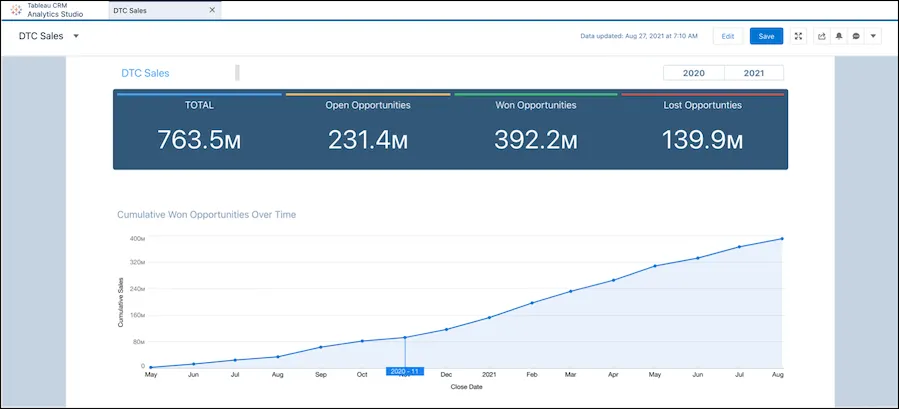
Customer Relationship Management (CRM) systems have evolved far beyond simple contact databases. Today, the true power of a CRM lies in its ability to deliver actionable insights through real-time dashboards. CRM dashboards provide visual snapshots of key metrics, sales performance, customer behavior, and team productivity—helping businesses make informed decisions faster.
But not all dashboards are created equal. The difference between a cluttered interface and a strategic decision-making tool comes down to how you design, interpret, and act on your CRM dashboards.
This article explores how to leverage CRM dashboards effectively to extract insights that lead to tangible business results.
1. What Are CRM Dashboards?
CRM dashboards are visual displays of key performance indicators (KPIs), metrics, and data trends collected within your CRM system. They present complex data in simplified, digestible formats such as:
- Graphs and charts
- Tables and tiles
- Gauges and funnels
- Heatmaps and scorecards
These dashboards can be customized by role—giving sales teams, marketing professionals, customer service reps, and executives the right data at the right time.
2. Why Actionable Insights Matter
Collecting data is easy. Acting on it is what creates value. CRM dashboards transform raw data into actionable insights by:
- Highlighting performance trends and anomalies
- Enabling proactive decision-making
- Uncovering opportunities for growth or efficiency
- Tracking progress toward strategic goals
- Identifying issues before they escalate
With the right setup, your CRM dashboard becomes a strategic command center, not just a reporting tool.
3. Essential Elements of an Effective CRM Dashboard
To extract meaningful insights, your CRM dashboard should include:
a. Real-Time Data Updates
Dashboards must reflect current data to support fast, accurate decisions—especially in sales environments where timing is critical.
b. Role-Based Views
Customize dashboards for each department or user:
- Sales: Pipeline value, deal velocity, quota attainment
- Marketing: Campaign performance, lead sources, conversion rates
- Customer Support: Ticket volume, resolution time, CSAT
- Executives: Revenue trends, churn rates, customer lifetime value
c. Key Metrics and KPIs
Avoid data overload. Focus on high-impact metrics such as:
- Sales conversion rate
- Average deal size
- Lead-to-opportunity ratio
- Support ticket backlog
- Customer engagement scores
d. Visual Clarity
Use intuitive visuals—bar charts, pie charts, heatmaps—to convey insights at a glance. A clean, uncluttered layout is essential.
4. Sales Insights from CRM Dashboards
CRM dashboards are a goldmine for sales teams. They offer real-time insights into:
a. Pipeline Health
Visualize deals by stage, value, and expected close date. Identify:
- Bottlenecks in the funnel
- Stagnant deals
- High-value opportunities
b. Sales Rep Performance
Compare reps on:
- Number of closed deals
- Average response time
- Win/loss ratio
- Revenue generated
Use this data to coach underperformers and reward top performers.
c. Forecast Accuracy
Analyze deal projections vs. actual revenue. Adjust forecasts and planning based on real-time progress.
5. Marketing Insights from CRM Dashboards
Marketing teams use CRM dashboards to tie campaigns directly to revenue and lead quality:
a. Lead Source Effectiveness
Track which sources generate the most leads and highest-converting customers (e.g., SEO, PPC, webinars).
b. Campaign ROI
Monitor open rates, click-throughs, conversions, and pipeline contribution for each marketing initiative.
c. Funnel Drop-Off Rates
Identify where leads are dropping out—nurturing emails, landing pages, or qualification stages—and optimize accordingly.
6. Customer Service Insights from CRM Dashboards
Customer support dashboards help service teams stay proactive and efficient:
a. Ticket Volume & Trends
Track daily, weekly, and monthly trends in incoming tickets to predict staffing needs.
b. First Response and Resolution Times
Set SLAs and monitor team performance against them in real time.
c. Customer Satisfaction (CSAT) and NPS
Visualize feedback scores and highlight patterns to improve service quality.
7. Executive-Level Insights from CRM Dashboards
For leadership, dashboards must offer a holistic view of business health:
a. Revenue Growth
Visualize trends across product lines, regions, or customer segments.
b. Customer Retention
Monitor churn rate, renewal rates, and engagement to gauge customer loyalty.
c. Lifetime Value (CLV)
Track CLV by industry, account manager, or acquisition channel to guide strategic investments.
8. Making Insights Actionable
Dashboards only become powerful when they drive real-time action. Here’s how to turn insights into outcomes:
a. Set Alerts and Thresholds
Trigger alerts when metrics fall outside of acceptable ranges—e.g., drop in conversion rate or spike in churn.
b. Drill Down for Root Causes
Enable deep dives from dashboards into individual records or data segments to understand why something is happening.
c. Automate Follow-Up Actions
Integrate CRM automation so insights lead directly to action—for example:
- Assign follow-up tasks when deal velocity slows
- Notify managers when a rep misses KPIs
- Launch nurture campaigns based on lead behavior
d. Share Insights Across Teams
Schedule automated dashboard reports to key stakeholders. Transparency drives alignment and accountability.
9. Choosing the Right CRM Dashboard Tools
Leading CRM systems with advanced dashboard capabilities include:
- Salesforce: Custom dashboards with real-time analytics and Einstein AI insights
- HubSpot: Drag-and-drop dashboards with pre-built templates for sales, marketing, and service
- Zoho CRM: Role-based dashboards with detailed reports and forecasting tools
- Pipedrive: Sales-focused dashboards with visual pipeline analytics
- Microsoft Dynamics 365: Enterprise dashboards with Power BI integration
Make sure your CRM offers customizable dashboards, mobile access, and drill-down functionality.
10. Best Practices for Getting the Most from CRM Dashboards
- Keep dashboards clean and focused – Don’t overload users with unnecessary data
- Review regularly – Schedule weekly or monthly review sessions to stay aligned
- Use visuals to tell a story – Data storytelling drives faster understanding
- Act on the data – Ensure insights lead to decisions and follow-through
- Involve stakeholders – Get feedback from users to refine and improve dashboards
Conclusion: CRM Dashboards Are More Than Reports—They’re Roadmaps
Your CRM dashboard is not just a reporting tool—it’s a strategic guide to daily actions and long-term decisions. The ability to extract real-time, actionable insights from CRM dashboards is what sets successful businesses apart in today’s competitive landscape.
With clear, customized, and insight-driven dashboards, your teams stay focused, aligned, and empowered to drive growth—backed by data, not guesswork.