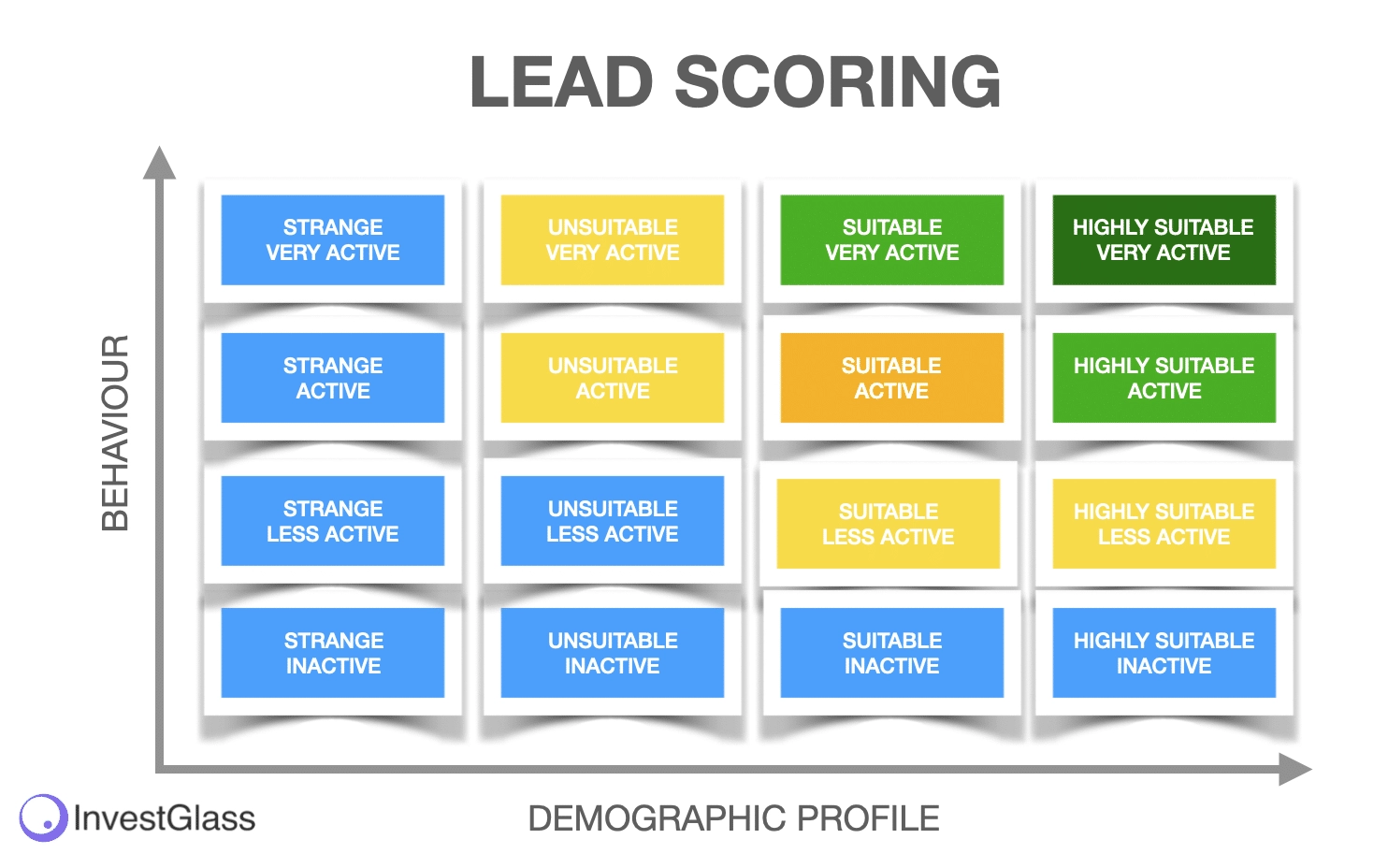
Lead scoring is a powerful strategy that helps businesses identify, prioritize, and convert the most promising prospects. By assigning a numerical value to leads based on their behavior and demographic characteristics, sales and marketing teams can focus their energy where it counts. When done right, a lead scoring model within your CRM can transform how your team nurtures prospects, shortens sales cycles, and increases revenue.
This guide walks through how to build an effective lead scoring model in your CRM, turning raw data into actionable insights that supercharge your sales pipeline.
What Is Lead Scoring and Why It Matters
Lead scoring is the process of ranking prospects based on their likelihood to convert into paying customers. The higher the score, the hotter the lead. This model enables teams to:
- Prioritize follow-ups with high-intent leads
- Segment audiences for targeted nurturing
- Improve conversion rates
- Align sales and marketing efforts
A CRM-integrated lead scoring model ensures that scores are updated automatically in real time, and actions are triggered based on scoring thresholds—streamlining your workflows and maximizing ROI.
1. Define Your Ideal Customer Profile (ICP)
Before assigning scores, identify who your ideal customer is. This forms the foundation of your lead scoring model. Consider:
- Firmographics: Company size, industry, location, revenue
- Demographics: Job title, seniority, decision-making authority
- Behavioral traits: Purchasing patterns, content engagement, past interactions
Leads that closely match your ICP should automatically receive higher scores, as they’re more likely to become customers.
2. Identify Key Lead Attributes
Next, identify the attributes that define lead quality in your CRM. These include:
Explicit (Static) Data
This is information the lead provides:
- Job title
- Industry
- Company size
- Budget
- Country or region
Implicit (Behavioral) Data
This is data based on the lead’s actions:
- Website visits
- Content downloads
- Email engagement (opens/clicks)
- Webinar attendance
- Free trial sign-ups
By scoring both types, you develop a balanced view of intent and fit.
3. Assign Point Values to Lead Attributes
Each lead attribute or behavior should be assigned a point value based on how closely it aligns with conversion likelihood.
Example of Explicit Scoring:
| Attribute | Value | Score |
|---|---|---|
| Job Title | C-Level Executive | +20 |
| Company Size | 100-500 employees | +15 |
| Industry | SaaS | +10 |
| Budget Fit | $10,000+ | +25 |
Example of Behavioral Scoring:
| Behavior | Action | Score |
|---|---|---|
| Email Opened | 3+ times in a week | +10 |
| Clicked on Product Page | Within the last 7 days | +15 |
| Downloaded Case Study | Recent engagement | +20 |
| Attended Webinar | Within 30 days | +25 |
Make sure these point values reflect real-world conversion trends observed in your CRM data.
4. Set Scoring Thresholds for Lead Stages
Define what scores move leads through your funnel:
- Marketing Qualified Lead (MQL): Score of 50+
- Sales Qualified Lead (SQL): Score of 75+
- Hot Lead: Score of 90+
These thresholds should automatically update lead status in the CRM, trigger sales alerts, or enroll leads in specific nurturing campaigns.
5. Build Your Scoring Model in Your CRM System
Most modern CRMs offer native lead scoring functionality. Here’s how to implement your model:
In HubSpot CRM:
- Navigate to Properties → Create a new “Lead Score” property
- Add positive and negative scoring rules
- Automate workflows based on score thresholds
In Salesforce:
- Use Einstein Lead Scoring or create a custom formula field
- Integrate with Marketing Cloud or Pardot for behavior-based scores
In Zoho CRM / Pipedrive / Freshsales:
- Use the lead scoring modules or rules engines
- Define criteria and assign point values
- Integrate scoring into your workflow automation
Ensure your CRM supports dynamic scoring, so lead scores evolve with engagement.
6. Include Negative Scoring Criteria
Not all leads are worth pursuing. Add negative scoring factors to filter out low-fit or disinterested contacts:
- Unsubscribes from email = -20
- Competitor company domain = -25
- Incomplete form submission = -10
- No activity in 30+ days = -15
This keeps your pipeline clean and ensures reps don’t waste time on unqualified prospects.
7. Use Lead Scoring to Trigger Automation
Once a lead hits a specific score, your CRM should trigger automated actions:
- Assign to a sales rep
- Send personalized follow-up emails
- Add to a high-priority call queue
- Enroll in advanced nurturing workflows
This automation speeds up response time and improves the lead experience—two factors critical to closing deals.
8. Monitor and Optimize Your Scoring Model
A lead scoring model isn’t “set it and forget it.” Use your CRM’s reporting tools to:
- Analyze which score ranges convert the most
- Adjust point values based on actual buyer behavior
- Remove outdated scoring criteria
- Test new scoring models for different customer segments
Regularly reviewing your lead scoring logic ensures it’s aligned with real-world outcomes and continuously improving conversion rates.
9. Align Sales and Marketing Teams
CRM-based lead scoring acts as a bridge between marketing and sales, ensuring both teams agree on what defines a quality lead. Best practices include:
- Collaborative workshops to define scoring rules
- Shared dashboards in the CRM
- SLAs (Service Level Agreements) for lead follow-up timelines
This alignment ensures high-scoring leads don’t go cold due to miscommunication or delays.
10. Scale Your Model with AI-Powered Predictive Scoring
For mature CRM environments, consider AI-based predictive lead scoring. Tools like:
- Salesforce Einstein
- HubSpot Predictive Lead Scoring
- Zoho Zia
These tools analyze historical CRM data to automatically assign scores based on probability of conversion—eliminating human bias and improving precision.
Conclusion: Lead Scoring Makes Your CRM Work Smarter
Building a lead scoring model within your CRM enables your team to focus on leads that matter, automate meaningful interactions, and ultimately close more deals faster. By combining demographic insights with behavioral signals, you gain a 360-degree view of lead potential—empowering your sales team with the tools to succeed.